




Ourisman Chrysler Jeep Dodge of Alexandria

Blog / How to connect Android Auto to your Jeep

Blog

All How to connect Android Auto to your Jeep Around Town Ourisman Chrysler Jeep Dodge Ram Ourisman Chrysler Jeep Dodge of Alexandria Ourisman Chrysler Jeep Dodge of Alexandria Service Community Alexandria Chrysler Dealer Alexandria, VA Alexandria Jeep Dealer Ourisman Jeep Fun Activities Alexandria Car Loan Alexandria Used Cars Ourisman Dodge Alexandria Chrysler Service CDJR Alexandria Service Center Food Ourisman Service Alexandria RAM Dealer Food in Alexandria Dodge Dealer Alexandria RAM 1500 2020 Alexandria Auto Service Alexandria RAM 1500 Alexandria SUV Chrysler Pacifica RAM Dealer Alexandria Car Financing Alexandria, VA Jeep Dealer 2020 Jeep RAM Dealership 2021 Alexandria Chrysler Dealership Alexandria Dodge Dealership Alexandria Jeep Grand Cherokee Cooking Jeep Jeep Gladiator 2020 Jeep Wrangler 2025 Jeep Technology 2026 RAM 1500 Alexandria Chrysler Pacifica Alexandria, VA Chrysler Pacifica Alexandria, VA Jeep Wrangler Antiquing Coffee Jeep Wrangler New RAM 1500 Features RAM Dealer Alexandria 2020 Jeep Gladiator 2021 Jeep Gladiator 2024 Best Family SUV 2025 Jeep SUV 2025 Jeep Wrangler 2025 RAM 1500 2025 RAM Trucks 2026 RAM Trucks Alexandria, VA Jeep Grand Cherokee Best 2026 Jeep SUVs Brake Service & Repair Burgers Desserts New Jeep Wrangler New Ram 1500 Trim Levels RAM RAM Features Restaurant 2018 Jeep Wrangler 2021 Jeep Renegade 2023 Jeep Wrangler 2024 Best Compact SUV 2024 Best Family Vehicle 2024 Best Off-roading SUV 2024 Dodge Hornet 2024 Grand Jeep Cherokee 2024 Jeep 2024 RAM 1500 2024 RAM 1500 Features 2025 Jeep Wrangler 4xe 2025 Jeep Wrangler Hybrid 2025 Jeep Wrangler Trim Levels 2025 RAM 1500 Ramcharger 2026 Jeep Cherokee 2026 Jeep Wrangler 2026 Jeep Wrangler Alexandria, VA 2026 RAM 2500 Alexandria Car Electrical Service Alexandria Dodge Durango Alexandria Dodge Hornet Alexandria Dodge Loan Alexandria, VA Chrysler Voyager Alexandria, VA Jeep Grand Cherokee 4xe Alexandria, VW RAM 1500 Alexandria,VA Car Financing Antique Best Take out and Food delivery Chrysler 300 Grill How to connect your iPhone to your Chrysler Jeep dealer in Alexandria New 2024 RAM 1500 New Dodge Durango New Dodge Hornet New Jeep Compass Ourisman CDJR of Alexandria SUVs Yoga 2018 Durango 2019 All-New RAM 1500 2019 Chrysler 300 2019 Chrysler Pacifica 2019 Dodge Grand Caravan 2019 Jeep Cherokee 2019 Jeep Compass 2019 Jeep Wrangler 2019 RAM 1500 2021 Chrysler 300 2021 Dodge Charger 2021 Dodge Durango 2021 Jeep Cherokee 2021 Jeep Wrangler 2021 RAM 1500 2021 RAM 2500 2023 Chrysler Pacifica 2023 Jeep Compass Alexandria, VA 2023 Jeep Grand Cherokee 2024 Best Family Van 2024 Chrysler Pacifica 2024 Dodge Durango 2024 Dodge Durango Trim Levels 2024 Dodge SUV 2024 Jeep Compass 2024 Jeep Compass Alexandria, VA 2024 Jeep Compass Trim Levels 2024 Jeep Grand Cherokee 2024 RAM 1500 Trim Levels 2025 Chrysler Pacifica 2025 Chrysler Voyager 2025 Dodge Charger Daytona 2025 Dodge Charger Daytona EV 2025 Dodge EV Vehicles 2025 Dodge Sports Cars 2025 Family Van 2025 Jeep Compass 2025 Jeep Grand Cherokee 4xe 2025 Ram 1500 Trim Levels 2026 Chrysler Pacifica 2026 Dodge Durango 2026 Dodge Durango Alexandria, VA 2026 Dodge Durango Trim Levels 2026 Jeep Grand Cherokee 2026 RAM 1500 Towing Power 2026 RAM 2500 Towing Power Alexandria Jeep Compass Alexandria Sports Car Alexandria, VA Dodge Charger Daytona Alexandria, VA Dodge Charger Daytona EV Alexandria, VA Jeep Compass Alexandria, VA Jeep Grand Compass Alexandria, VA Mini Van Anchor Bar Best 2025 SUVs Best Camping Grounds Best Jeeps for road trips Breakfast Chrysler Electrical Problems Cooking Classes Cooking Classes in Alexandria Dodge Durango Alexandria, VA Dodge Electrical Problems Dodge Grand Caravan Fishing Spots Flowers fountains day spa George Washington Masonic National Memorial golf Courses group fitness Gym Historic Sites hot yoga Hotels How to connect Android Auto To Your Chrysler How to connect Android Auto to your RAM How to Connect Android Auto To Your Your Dodge How to connect Apple CarPlay To Your Chrysler How to connect Apple CarPlay to your Jeep How to connect Apple CarPlay to your RAM How to connect your Android to your Chrysler How to connect your Android to your Jeep How to connect your Android to your RAM How to Connect Your Android To Your Your Dodge How to connect your iPhone to your Jeep How to connect your iPhone to your RAM How to Connect Your iPhone To Your Your Dodge How to Use Apple CarPlay To Your Your Dodge Irish Pub Jeep Electrical Problems King Street Mexican mexican restaurant Museum New Car Military Discount Alexandria, VA New Car Military Discount Fort Belvoir New Car Military Discount Quantico New Chrysler Pacifica New Chrysler Pacifica Features New Chrysler Voyager New Grand Jeep Cherokee New Jeep Grand Cherokee New Ram charger New Ramcharger Pizza Pizzeria Ram Electrical Problems RAM Military Discount RAM Military Discount Alexandria, VA Smell the Flowers sugar house day spa Tacos Tequila The Magnolia Room Vegan Restaurants Winkler Botanical Preserve Workout
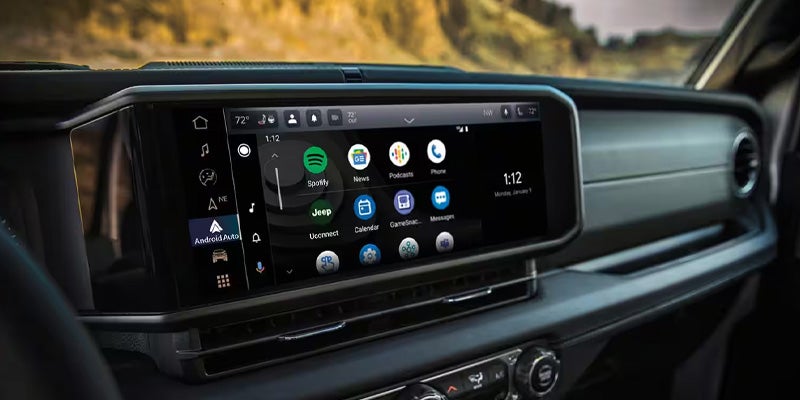
jeep dash 06 (12)

How to Use Apple CarPlay® and Android Auto® in Your Jeep

As technology continues to evolve, the integration of smart devices with your vehicle has become more seamless. Jeep’s Apple CarPlay® and Android Auto® systems make it easier than ever to stay connected while on the road. Whether you’re driving a new Jeep Cherokee, Grand Cherokee, Wrangler, or Gladiator, both features enhance your driving experience by providing hands-free control of your smartphone, right from your vehicle's infotainment system. Here’s how you can easily connect and enjoy these features in your Jeep. Connecting Your Jeep to Apple CarPlay® and Android Auto® Apple CarPlay® Setup Ensure Compatibility: First, ensure your Jeep is equipped with the Uconnect® system. Most Jeep models from 2017 onward support Apple CarPlay®. Prepare Your iPhone: Make sure your iPhone is running iOS 7.1 or later and that you have the latest version of the Apple Maps app installed. USB Connection: Use a certified USB cable to connect your iPhone to the Jeep's USB port. The USB port is typically located in the center console or near the infotainment screen. Activate CarPlay®: Once connected, the Uconnect® system should automatically prompt you to enable Apple CarPlay®. Follow the on-screen instructions to grant permission for the connection. Wireless Apple CarPlay® (If Available): If your Jeep supports wireless connectivity, you can also use Apple CarPlay® without the need for a USB cable. Simply connect via Bluetooth after enabling the feature in your vehicle’s settings. Access Apple CarPlay®: After the setup, your iPhone’s apps, such as Maps, Music, and Messages, will appear on the Uconnect® display. Use the touchscreen or voice commands to control them while driving. Android Auto® Setup Ensure Compatibility: Android Auto® is compatible with most Android devices running Android 5.0 (Lollipop) or higher. Ensure that your Jeep has the Uconnect® system with Android Auto® support, typically available in models from 2017 onward. Prepare Your Android Device: Download and install the Android Auto® app from the Google Play Store if it's not already pre-installed on your device. Ensure your smartphone is connected to the internet. USB Connection: Use a USB cable to connect your Android phone to your Jeep’s USB port. Similar to Apple CarPlay®, this connection allows you to access Android Auto® on your vehicle's infotainment system. Enable Android Auto®: Once your phone is connected, follow the on-screen prompts to allow Android Auto® access. You may need to enable permissions for the app to sync with the Uconnect® system. Wireless Android Auto® (If Available): If your Jeep is equipped with wireless connectivity, you can connect your Android phone via Bluetooth and Wi-Fi, without the need for a physical cable. Access Android Auto®: After the initial setup, your phone’s apps such as Google Maps, Spotify, and Google Assistant will appear on the Uconnect® screen. You can control these apps through voice commands or by touching the screen. Benefits of Using Apple CarPlay® and Android Auto® in Your Jeep Hands-Free Control: Both systems allow you to make calls, send texts, get directions, and play music without taking your hands off the wheel. Using voice commands through Siri or Google Assistant enhances safety and convenience. Seamless Integration: Apple CarPlay® and Android Auto® integrate your phone’s apps directly into the Uconnect® system, making it easy to access your favorite music, navigation apps, and contacts. Enhanced Navigation: Whether you prefer Apple Maps or Google Maps, both navigation systems provide turn-by-turn directions, real-time traffic updates, and alternate routes, all visible on your Jeep's screen. Music and Entertainment: Stream your favorite music, podcasts, and audiobooks from Apple Music, Spotify, or other compatible apps without needing to manually operate your phone. Stay Connected: Keep up with important notifications, messages, and calls while on the road, all through the Uconnect® system. Your phone stays in your pocket or bag, reducing distractions. Conclusion Apple CarPlay® and Android Auto® make driving a Jeep more convenient and enjoyable by integrating your smartphone seamlessly into your vehicle. Whether you're navigating the busy streets of Alexandria, VA, or embarking on a long road trip, these features provide hands-free control, entertainment, and enhanced safety. Follow the simple steps above to set up Apple CarPlay® or Android Auto® in your Jeep and enjoy the benefits of staying connected on the road. For more information on Jeep technology and Uconnect® features, feel free to contact us or stop by for a personalized demonstration at Ourisman CDJR of Alexandria.
Contact Us

Fill out this form below and we'll contact you shortly
*Required Fields