





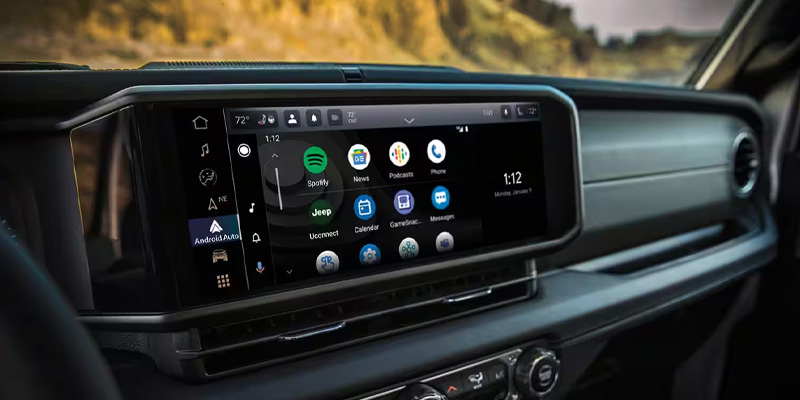
As technology continues to evolve, the integration of smart devices with your vehicle has become more seamless. Jeep’s Apple CarPlay® and Android Auto® systems make it easier than ever to stay connected while on the road. Whether you’re driving a new Jeep Cherokee, Grand Cherokee, Wrangler, or Gladiator, both features enhance your driving experience by providing hands-free control of your smartphone, right from your vehicle’s infotainment system. Here’s how you can easily connect and enjoy these features in your Jeep.
Connecting Your Jeep to Apple CarPlay® and Android Auto®
Apple CarPlay® Setup
- Ensure Compatibility:
First, ensure your Jeep is equipped with the Uconnect® system. Most Jeep models from 2017 onward support Apple CarPlay®. - Prepare Your iPhone:
Make sure your iPhone is running iOS 7.1 or later and that you have the latest version of the Apple Maps app installed. - USB Connection:
Use a certified USB cable to connect your iPhone to the Jeep’s USB port. The USB port is typically located in the center console or near the infotainment screen. - Activate CarPlay®:
Once connected, the Uconnect® system should automatically prompt you to enable Apple CarPlay®. Follow the on-screen instructions to grant permission for the connection. - Wireless Apple CarPlay® (If Available):
If your Jeep supports wireless connectivity, you can also use Apple CarPlay® without the need for a USB cable. Simply connect via Bluetooth after enabling the feature in your vehicle’s settings. - Access Apple CarPlay®:
After the setup, your iPhone’s apps, such as Maps, Music, and Messages, will appear on the Uconnect® display. Use the touchscreen or voice commands to control them while driving.
Android Auto® Setup
- Ensure Compatibility:
Android Auto® is compatible with most Android devices running Android 5.0 (Lollipop) or higher. Ensure that your Jeep has the Uconnect® system with Android Auto® support, typically available in models from 2017 onward. - Prepare Your Android Device:
Download and install the Android Auto® app from the Google Play Store if it’s not already pre-installed on your device. Ensure your smartphone is connected to the internet. - USB Connection:
Use a USB cable to connect your Android phone to your Jeep’s USB port. Similar to Apple CarPlay®, this connection allows you to access Android Auto® on your vehicle’s infotainment system. - Enable Android Auto®:
Once your phone is connected, follow the on-screen prompts to allow Android Auto® access. You may need to enable permissions for the app to sync with the Uconnect® system. - Wireless Android Auto® (If Available):
If your Jeep is equipped with wireless connectivity, you can connect your Android phone via Bluetooth and Wi-Fi, without the need for a physical cable. - Access Android Auto®:
After the initial setup, your phone’s apps such as Google Maps, Spotify, and Google Assistant will appear on the Uconnect® screen. You can control these apps through voice commands or by touching the screen.
Benefits of Using Apple CarPlay® and Android Auto® in Your Jeep
- Hands-Free Control:
Both systems allow you to make calls, send texts, get directions, and play music without taking your hands off the wheel. Using voice commands through Siri or Google Assistant enhances safety and convenience. - Seamless Integration:
Apple CarPlay® and Android Auto® integrate your phone’s apps directly into the Uconnect® system, making it easy to access your favorite music, navigation apps, and contacts. - Enhanced Navigation:
Whether you prefer Apple Maps or Google Maps, both navigation systems provide turn-by-turn directions, real-time traffic updates, and alternate routes, all visible on your Jeep’s screen. - Music and Entertainment:
Stream your favorite music, podcasts, and audiobooks from Apple Music, Spotify, or other compatible apps without needing to manually operate your phone. - Stay Connected:
Keep up with important notifications, messages, and calls while on the road, all through the Uconnect® system. Your phone stays in your pocket or bag, reducing distractions.
Conclusion
Apple CarPlay® and Android Auto® make driving a Jeep more convenient and enjoyable by integrating your smartphone seamlessly into your vehicle. Whether you’re navigating the busy streets of Alexandria, VA, or embarking on a long road trip, these features provide hands-free control, entertainment, and enhanced safety. Follow the simple steps above to set up Apple CarPlay® or Android Auto® in your Jeep and enjoy the benefits of staying connected on the road.
For more information on Jeep technology and Uconnect® features, feel free to contact us or stop by for a personalized demonstration at Ourisman CDJR of Alexandria.
Connect with us


Recent Blog Entries
- Inside the 2026 RAM 1500 TRX: Towing, Interior Comfort, and Technology
- How the RAM Military Discount Program Works in Alexandria, VA
- What’s New in the 2026 RAM 2500’s Towing Capacity and Power
- 2026 Jeep Cherokee Hybrid: Fuel Efficiency and Range You’ll Love
- The 2026 Dodge Durango: Power, Performance, and Luxury